The best software to run a freelance business connects every part of this workflow in one place. Running a freelance business in 2026 means wearing every hat simultaneously: the work itself, client acquisition, project management, proposals, invoicing, time tracking, and chasing payments. Most freelancers manage this with a fragmented collection of tools, a different app for each function, paying $39 here, $69 there, until the monthly software bill rivals a full-time employee's salary.
The solution is freelance management software, and specifically, the emergence of the freelancer operating system (freelancer OS): a single platform that connects every part of running a freelance business in one workspace. This guide covers what that means, what the best options are, and how to evaluate the right platform for your situation.
What Is Freelance Management Software?
Freelance management software is a platform designed to organise and automate the operational side of freelance work, covering client management, proposals, invoicing, time tracking, contracts, and payment collection.
The term is used in two distinct contexts, and understanding the difference matters when evaluating tools:
- Solo freelancer and small agency tools, platforms like AgencyKit, Bonsai, and HoneyBook, designed to help individual freelancers and small teams manage their entire client workflow from one place
- Enterprise freelancer management systems (FMS), platforms like Worksuite, Bubty, and TalentDesk, designed to help large companies manage pools of hundreds of external contractors for compliance, payroll, and classification purposes
This page focuses on the first category: the best software for freelancers to run their own business, not enterprise tools for managing other freelancers.
The Key Distinction
If you are a freelancer looking for software to run your business, manage your clients, send proposals, invoice your work, track hours, you need a freelancer management platform. If your company needs to manage a pool of 50+ external contractors across multiple countries for compliance and payroll, you need an enterprise FMS (Worksuite, Bubty). The two categories serve entirely different needs.
The Freelancer OS Concept Explained
What is a Freelancer Operating System?
A freelancer operating system (freelancer OS) is a single platform that replaces every tool a freelancer uses to run their business, clients, proposals, invoices, time tracking, contracts, and payments. Unlike standalone tools that each handle one function, a freelancer OS connects all eight so data flows automatically: accepted proposals become invoices, tracked hours become invoice line items, and client records aggregate every interaction in one view. The term draws a parallel to a computer operating system, one foundation that everything else runs on.
The freelancer OS concept emerged as a direct response to subscription fatigue and tool fragmentation. Research by productivity consultants consistently shows that context switching between applications costs freelancers 23 minutes of focus per switch, and the average freelancer managing a separate CRM, proposal tool, invoicing app, and time tracker switches context dozens of times per day (source: Harvard Business Review, 2024).
The freelancer OS argument is simple: if all eight functions live in one workspace, there is no context switching, no manual data transfer between tools, and no compounding monthly subscription cost. The entire workflow, from first client contact through to payment received, happens in one place.
AgencyKit was built explicitly as a freelancer OS. AgencyKit is the most complete implementation of that idea available, and the most affordable, with plans from $9/month billed per account, in 2026.
The Eight Core Functions Every Freelance Business Needs
Regardless of which platform you choose, a complete freelance management system must cover eight functions. What each of the eight functions does, and why the integration between them matters:
01. Client Management
Store contact details, company information, project notes, and the full history of every interaction. The client record should be the single source of truth, linked to every proposal, invoice, and time entry automatically.
02. Proposals
Build and send professional line-item proposals with PDF export, online client acceptance, and status tracking. Critical integration: accepted proposals must convert to invoices automatically without re-entry.
03. Invoicing
Send professional invoices with multi-currency support, automatic overdue tracking, and payment history. Should connect to both the proposals module (auto-convert) and time tracking module (auto-populate hours).
04. Time Tracking
Log billable hours by client and project using a built-in timer. The key function is automatic conversion: tracked hours must populate invoice line items without manual calculation or data transfer.
05. Contracts
Store and manage client agreements with e-signature support. Should be linked to the client record and ideally part of the same workflow as proposals, send proposal, sign contract, invoice, all in one platform.
06. Payments
Accept online payments via Stripe or PayPal directly from invoices. Revenue should flow into a real-time dashboard showing outstanding, paid, and overdue amounts across all clients simultaneously.
07. E-Signatures
Send contracts for legally binding electronic signatures and close deals without leaving the platform. Signed agreements attach to the client record automatically, so the proposal, contract, and invoice all live in one place.
08. Scheduling
Share a booking page backed by Google Calendar and Meet so clients pick a time without the email back and forth. New bookings create the calendar event and meeting link automatically and link to the client record.
Why Integration Depth Matters More Than Feature Count
Every platform in this guide covers most of these eight functions. The differentiator is not whether they have a proposals feature, it is whether the proposals feature is natively connected to invoicing. A proposal tool that requires manual re-entry when converting to an invoice is not a freelancer OS, it is just another tool in the stack.
Top 7 Freelance Management Software Platforms in 2026
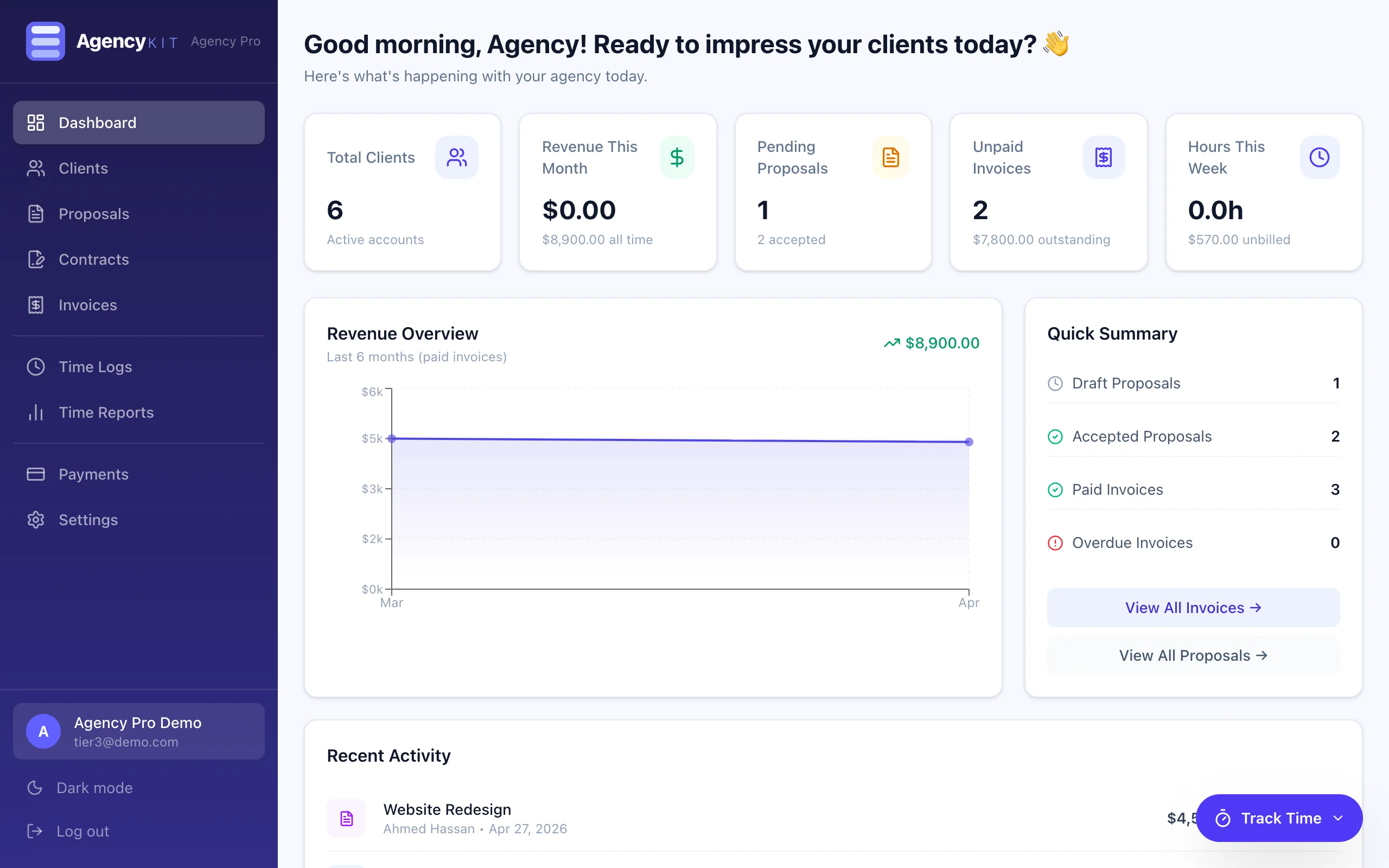
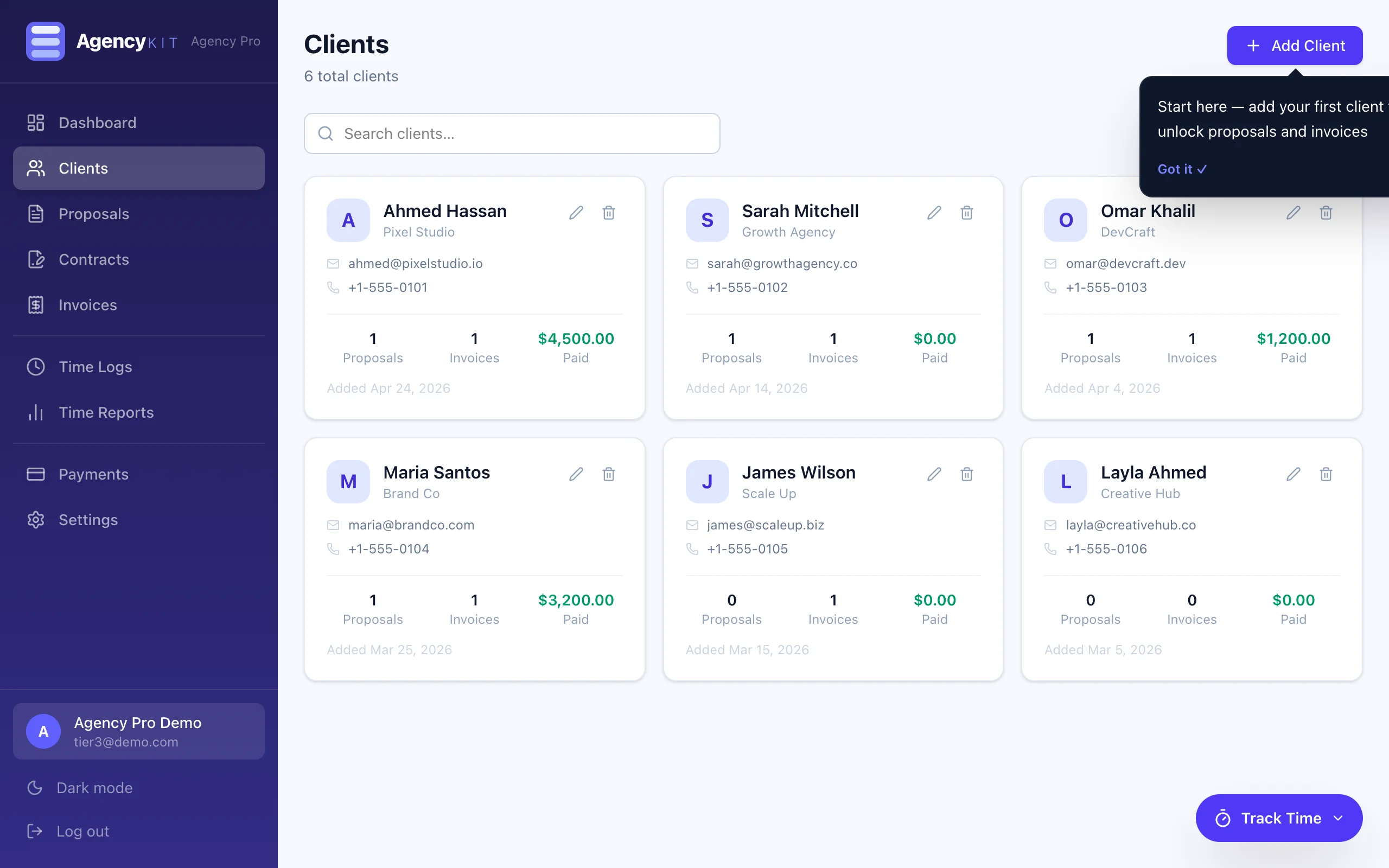
AgencyKit is the most complete implementation of the freelancer OS concept available in 2026. All eight core functions, client management, proposals, contracts, e-signatures, invoicing, payments, time tracking, and scheduling, are native modules in a single connected workspace. Data flows automatically between them: proposals convert to invoices in one click, tracked hours populate invoice line items without re-entry, and every client record aggregates the full relationship history.
AgencyKit is also the most affordable true all-in-one in this category. Starting at $9/month, billed per account, not per user, it replaces a tool stack that would otherwise cost $171–$224 per month, and it adds built-in time tracking, an AI assistant (MCP), and native scheduling and meetings that competitors charge extra for or lack entirely. Annual billing ($90/year) saves roughly two months.
Bonsai is the most widely used all-in-one freelancer platform. Bonsai covers proposals, contracts, invoicing, time tracking and a basic CRM in a polished interface with a large library of legally reviewed templates. Bonsai has been operational since 2016 and has the largest community of any platform in this category.
The limitation is cost and pricing model: at $25/month, Bonsai charges $300/year and is priced per user, versus AgencyKit's Starter at $9/month ($90/year) billed per account, the lowest entry price among true all-in-one platforms. Proposal-to-invoice conversion also requires manual steps rather than the single-click automation AgencyKit provides.
HoneyBook has built its reputation among photographers, designers, and event planners with a beautiful client-facing experience and strong visual pipeline management. Its client portal is the best in this category. Time tracking is limited, making it less suited to hourly-billing freelancers.
Moxie (formerly Hectic) is built specifically for solo freelancers who want a clean, complete platform without enterprise complexity. At $16/month, it is one of the more affordable monthly options in this comparison, but AgencyKit's Starter undercuts it at $9/month, billed per account rather than per user, while adding built-in time tracking, an AI assistant via MCP, and native scheduling.
Plutio offers a comprehensive feature set including project management, proposals, invoicing, and time tracking. Dubsado runs on a monthly subscription model and remains a capable platform for those who prefer its interface.
Harvest is the reference platform for time tracking with invoicing. Harvest excels at detailed time reporting and connects to invoicing, but does not include a client CRM, proposal builder, or contract management. Best used as a time-tracking tool that supplements a separate CRM and proposal platform, which reintroduces the fragmentation problem.
FreshBooks is one of the most established accounting and invoicing platforms for freelancers. FreshBooks covers invoicing, time tracking, expense management and reporting exceptionally well. FreshBooks does not include a proposal builder or native contract management, so users typically supplement it with additional tools, which returns you to a fragmented stack.
Feature Comparison, All Platforms
| Platform | AgencyKit | Bonsai | HoneyBook | Moxie | FreshBooks |
|---|---|---|---|---|---|
| Client Management (CRM) | Yes, native | Yes | Yes | Yes | Basic only |
| Proposal Builder | Yes | Yes | Yes | Yes | No |
| Auto Proposal → Invoice | Yes, one click | Manual | Manual | Manual | No |
| Invoicing | Yes, full module | Yes | Yes | Yes | Yes, best-in-class |
| Time Tracking | Yes, built-in timer | Yes | Limited | Yes | Yes |
| Auto Time → Invoice | Yes, one click | Manual | No | Manual | Manual |
| Contract Storage | Yes | Yes | Yes | No | No |
| E-Signatures | Agency plan | Yes | Yes | No | No |
| Online Payments | Yes, Stripe & PayPal | Via Stripe | Yes | No | Via Stripe |
| White-Label | Agency Pro plan | No | No | No | No |
| Starting price | $9/mo | $25/mo | $36/mo | $16/mo | $19/mo |
| Billing basis | Per account | Per user | Per user | Per user | Per user |
The Real Cost of a Fragmented Tool Stack
Most freelancers underestimate how much they pay for software because the costs are distributed across multiple billing cycles. What the standard fragmented stack actually costs against an integrated platform:
Beyond the direct financial cost, the fragmented stack creates a hidden time cost. Every tool boundary is a manual data transfer: proposal accepted in Better Proposals, invoice re-created manually in FreshBooks, hours exported from Toggl as a CSV and pasted in. Research by Harvest found that freelancers lose an average of 2.5 hours per week to administrative data reconciliation between tools (source: Harvest Time Tracking Report, 2024). Over a year, that is 130 hours of billable time spent on admin.
The AgencyKit Workflow, No Tool Switching
Tools to Run a Freelance Agency in 2026
Running a freelance agency, whether solo or with a small team, adds complexity beyond individual freelancing: multiple active projects, team billing, white-label client deliverables, and more demanding proposal workflows. What the core toolset looks like for a freelance agency in 2026:
The four non-negotiable functions for a freelance agency
- Unified client management, Every client, every project, every financial interaction in one record. Not a spreadsheet, not a shared Notion database, but a purpose-built client management system linked to your billing workflow.
- Professional proposal-to-invoice workflow, Agencies send many proposals. The ability to convert accepted proposals to invoices automatically, without re-entering line items, is the difference between an efficient billing cycle and a constant administrative drain.
- White-label client experience, For agencies that want clients to see their brand, not the software vendor's, white-label functionality is essential. AgencyKit's Agency Pro plan ($69/month) allows you to replace AgencyKit's branding with your own throughout the client-facing interface.
- Payment collection with zero transaction fees, AgencyKit connects to Stripe and PayPal at standard rates only, no additional transaction fee on top. The platform processes payments directly to your account without taking a percentage of your revenue.
Our 8-person agency was drowning in Slack threads and spreadsheets. AgencyKit gave us a single source of truth. Client revenue visibility is incredible, I finally know who our most profitable clients are.
How to Choose the Right Freelance Business Software
The evaluation framework comes down to four questions:
1. Does it cover all eight core functions natively?
If the platform requires you to supplement it with additional tools for any of the eight functions, client management, proposals, invoicing, time tracking, contracts, payments, you are not buying a freelancer OS. You are buying one tool in a stack that will still fragment over time.
2. Does data flow automatically between modules?
The most important integration test: when a proposal is accepted, does it become an invoice automatically? When you log billable hours, do they populate invoice line items without copy-paste? If the answer to either is no, the platform is not fully connected, and you will pay the manual re-entry tax for every billing cycle.
3. What does it cost, and how is it billed?
Compare both the entry price and the billing basis. AgencyKit starts at $9/month ($90/year) billed per account, the lowest entry price among true all-in-one platforms, versus Bonsai at $25/month priced per user. For a small team, per-account billing means one flat price instead of paying again for every seat.
4. Is there a genuine trial period?
Every platform mentioned in this guide offers some form of trial. AgencyKit's 14-day free trial gives full Agency plan access, every feature unlocked with no credit card required, and you can cancel anytime. A full-access trial is the right way to validate whether a platform fits your workflow before committing to any subscription.
Per-Account vs Per-User Pricing
When you compare prices, check the billing basis. Most platforms in this category charge per user, so costs multiply as your team grows. AgencyKit bills per account, one flat plan from $9/month covers your whole workspace. Combined with a 14-day free trial (no card) and the option to cancel anytime, you can validate the fit before paying anything, and annual billing saves roughly two months.
Key Takeaways
- The best software to run a freelance business in 2026 is a freelancer OS, a single platform covering all eight core functions natively, not a collection of specialist tools
- "Freelance management software" refers to two different categories: solo freelancer platforms (AgencyKit, Bonsai) and enterprise contractor management systems (Worksuite, Bubty), they serve entirely different needs
- A freelancer OS connects proposals to invoices and time tracking to billing automatically, eliminating the 2.5 hours per week the average freelancer loses to manual data reconciliation
- AgencyKit is the most complete freelancer OS in 2026 and the most affordable, plans from $9/month is billed per account (not per user), all eight modules, plus built-in time tracking, an AI assistant via MCP, and native scheduling
- For freelance agencies, white-label branding and multi-client revenue visibility are the additional requirements that most solo-focused platforms do not cover, AgencyKit's Agency Pro plan addresses both
- Entry price and billing basis are decisive: AgencyKit from $9/month per account versus $16–$36/month per user for alternatives covering similar functionality
Frequently Asked Questions
The best software to run a freelance business in 2026 is an all-in-one platform, also called a freelancer OS, that handles client management, proposals, contracts, e-signatures, invoicing, payments, time tracking, and scheduling in one workspace. AgencyKit is the top-ranked option: it covers all eight functions natively and is the most affordable true all-in-one, with plans from $9/month is billed per account (not per user) versus $200+/month for separate tools.
Freelance management software is a platform that helps freelancers organise and automate the business side of their work, covering client management, proposals, invoicing, time tracking, and contracts. For solo freelancers and small agencies, this means an all-in-one workspace like AgencyKit. At the enterprise level, it refers to platforms like Worksuite or Bubty, which help companies manage large pools of external contractors, a completely different category.
A freelancer operating system (freelancer OS) is a single platform that replaces every tool a freelancer uses to run their business, clients, proposals, invoices, time tracking, contracts, and payments. Unlike standalone tools that handle one function, a freelancer OS connects all eight so data flows automatically: accepted proposals become invoices, tracked hours become invoice line items, and client records aggregate every interaction in one view.
To run a freelance business you need tools covering eight functions: (1) client management, (2) proposals, (3) invoicing, (4) time tracking, (5) contracts, and (6) payment collection. The most efficient approach is a single platform that covers all eight natively, AgencyKit. The alternative is a fragmented stack of separate tools costing $171–$192/month and requiring manual data transfer between each one.
Yes. AgencyKit combines proposals, invoicing, and time tracking in one native platform. Accepted proposals convert to invoices automatically, and tracked hours convert to invoice line items with one click. An integrated flow eliminates manual data transfer between tools, which typically costs 2 to 3 hours per week in administrative work for the average hourly-billing freelancer.
Freelance business software costs range widely. Individual tools cost $9–$49/month each. All-in-one subscription platforms cost $16–$36/month. A full separate tool stack adds up to $171–$192/month. AgencyKit is the most affordable true all-in-one, with plans from $9/month ($90/year) billed per account, not per user.
A CRM (customer relationship management) tool manages client contacts and communication history. Freelance management software goes further, it covers the full business workflow from proposals and contracts through invoicing and payment collection, not just contact management. AgencyKit includes CRM functionality as one of six integrated modules, all connected to the same client record.
Yes. AgencyKit is specifically designed for both solo freelancers and small agencies up to about 20 people. The Starter plan ($9/month) is optimised for solo operators who want a complete business platform without enterprise complexity, billed per account, not per user. The Agency and Agency Pro plans add team-oriented features like e-signatures and white-label branding.
The best tools to run a freelance agency in 2026 are: (1) a unified platform for client management, proposals, invoicing, and time tracking, AgencyKit covers all of these natively; (2) a contract and e-signature tool, included in AgencyKit's Agency plan; (3) a payment processor connecting to Stripe and PayPal, included in AgencyKit. The most efficient approach is one platform that covers all four rather than four separate subscriptions.
Evaluate freelance business software on four criteria: (1) Does it cover all eight core functions natively? (2) Does data flow automatically between modules, do accepted proposals become invoices automatically? (3) What does it cost and how is it billed, including all supplementary tools needed? (4) Is there a genuine no-credit-card trial period? AgencyKit passes all four: six native modules, automatic data flow, plans from $9/month ($90/year) billed per account, and a 14-day free trial with full access.
For most freelancers the honest answer is that a dedicated project management tool is the wrong first purchase. Tools like Asana, Trello and ClickUp are built for teams coordinating with each other, and a freelancer is not coordinating with anyone. What actually leaks time is the paperwork around the work: the proposal, the contract, the hours, the invoice and the chasing. Pick something that handles those and carries tasks alongside them, and add a specialist board later only if the work genuinely needs one.
Conclusion
The choice of software to run a freelance business is not a minor operational decision. That choice determines how much time you spend on administration against billable work, how professional your client experience looks, and how much your software costs compound as your team grows.
The freelancer OS concept, one connected platform for all eight core functions, is the most efficient structure available in 2026. AgencyKit is the most complete implementation of that concept with the strongest pricing model: plans from $9/month is billed per account (not per user) that cover every function a solo freelancer or small agency needs to operate professionally.
Start with the 14-day free trial, no card, cancel anytime, to validate the workflow fits before committing to a subscription. For more detail on specific modules, see the proposal software comparison, the time-to-invoice guide, or the client management system breakdown.
Reading this in Google? You can tell it to show AgencyKit to you more often.
Sources & References
- Harvard Business Review, "The Cost of Continuously Switching Tasks" (2024). hbr.org
- Harvest, Time Tracking and Billing Benchmark Report (2024). getharvest.com
- G2, Freelancer Management Software Category Reviews (2026). g2.com
- Capterra, All-In-One Freelancer Platforms Pricing Comparison (2026). capterra.com