In This Guide
What it actually means
Almost every project tool will let you invite a client. A shared board is not the same as a client portal, and the difference is the whole point of this page.
Inviting a client means giving them a seat in the room your team works in. A client invited to the board sees the task names, the internal comments and whatever somebody typed at eleven at night. Most tools charge you for that seat. Many clients never log in twice.
A client portal is a separate door. The client gets a page that belongs to them, showing the parts of the project you decided they should see, in language written for them. Your team keeps working on the messy board behind it.
The test that separates the two
Ask whether the client can see a task you have not marked as client visible. If the answer is yes, you have a shared board with extra steps, not a portal.
Why a client view is different from a shared board
Three things change when the client has their own view.
The status update writes itself. Most agencies spend part of every Friday telling clients what happened this week. When the client can open a page and see it, that hour comes back, and the client stops asking.
Approvals stop living in email. A deliverable that needs a yes is a deliverable that is waiting. In email it waits invisibly. In a portal it sits in a list with the date it was sent, and when the client approves it, the task moves and the clock stops.
You stop paying for people who do not work here. Per-seat pricing punishes you for having clients. If a tool charges per user and you have thirty clients, you are paying for thirty logins that get used once a month.
Six things worth checking
Before you commit, put these to the tool you are considering.
- Is client visibility per item or all or nothing? You want to choose which tasks the client sees, not flip one switch for the whole project.
- Can the client approve, or only look? Read-only portals still leave you chasing a yes by email.
- Does the portal carry your brand or the vendor logo? This matters more if you are the agency of record for a client who has their own clients.
- Do contracts and invoices live there too? If the client signs in one tool and pays in another, the portal is only a third of a portal.
- Are client logins charged as seats? Ask this before the demo ends.
- Does it work in your currency and your country? Several of the best known tools in this category still only take payments in a handful of markets.
What it costs
The category splits into three price shapes, and the shape matters more than the number.
| Shape | What you pay for | Typical |
|---|---|---|
| Per user, per month | Every teammate, and often every client login | $8 to $25 each |
| Per account, per month | One flat fee, the team and the clients included | $9 to $69 |
| Portal bolted onto a PM tool | The base tool plus a portal add-on or a second product | Two bills |
For a team of five with twenty clients, the difference between per seat and per account is usually the difference between a hundred dollars a month and less than fifty.
How AgencyKit does it
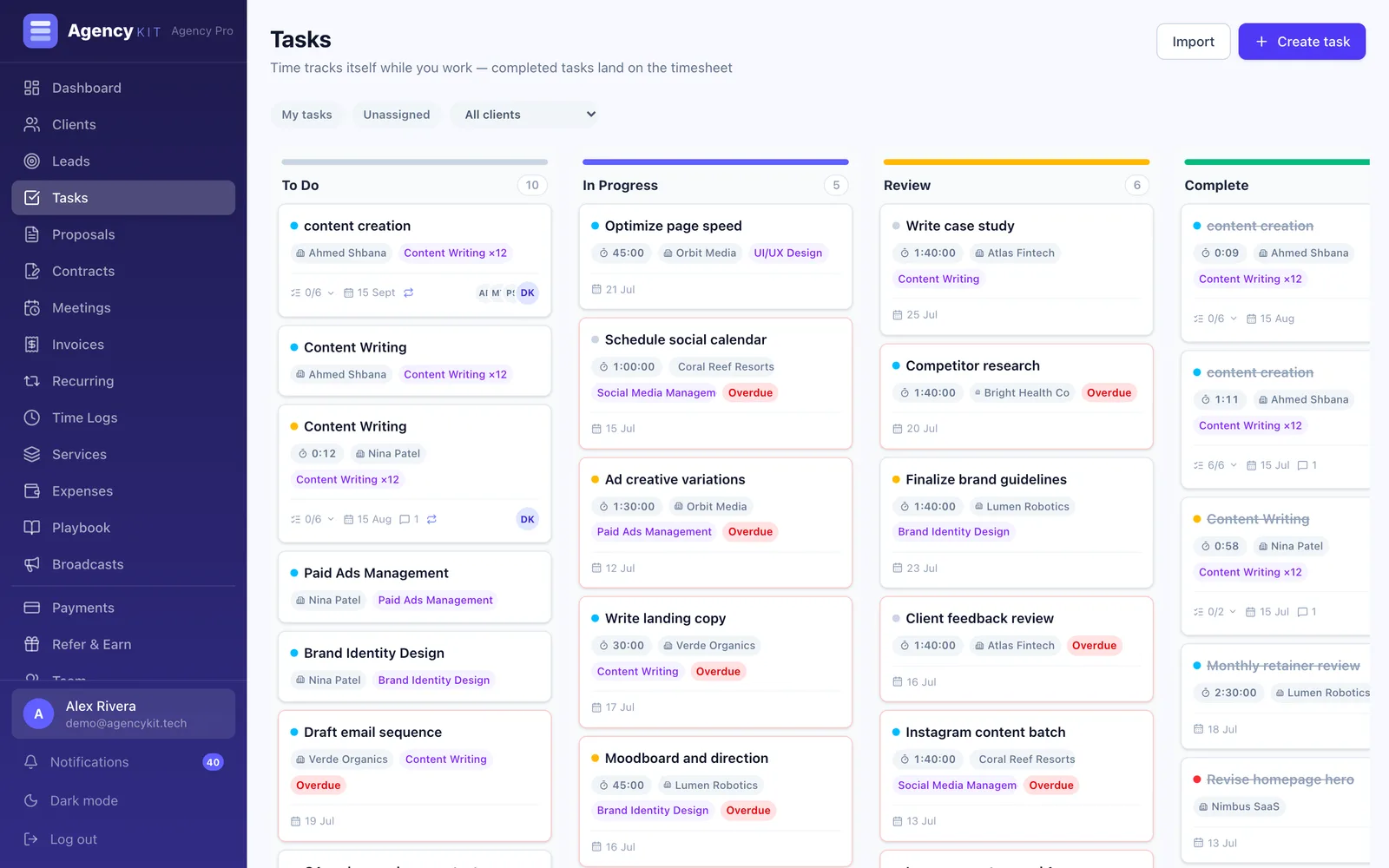
AgencyKit is built around that split between the internal board and the client's view. Your team works on a kanban board with timers, assignees and checklists. Each client gets a branded portal that shows only what you marked client visible.
Inside the portal the client can follow project progress, approve or request changes on a deliverable, read their brief, sign a contract, pay an invoice, and book a call with their account manager. When they approve something, the task moves on your board and the time already logged against it is billed. Nobody re-types anything.
Pricing is per account rather than per user, so adding a client costs nothing, and it works in USD, EUR, GBP, EGP, SAR and AED.
Key Takeaways
- A client portal is a separate view for the client, not a seat on your team board
- The useful ones let you choose visibility per item rather than per project
- Approvals inside the portal are what stop deliverables waiting invisibly in email
- Per-seat pricing charges you for having clients, which is the wrong incentive
- Check contracts and invoices are in the same portal before you commit
Frequently Asked Questions
Project management software with a client portal lets your team manage work on an internal board while each client gets a separate branded page showing the parts of the project you chose to share. The client can usually follow progress and approve deliverables there, and in the better tools sign contracts and pay invoices in the same place, without taking a paid seat in your workspace.
No. A guest sits inside your workspace and can generally see the board, the task names and the internal comments. A portal is a separate view built for the client, showing only what you marked as visible, written in language meant for them. Guest seats are also often billed, while portals in per-account tools are not.
In some tools yes, in many only reading is possible. It is worth checking, because approval is the part that saves time. When a client approves inside the portal the task can move on automatically and the hours logged against it can be billed, instead of somebody chasing a yes by email and then updating two systems by hand.
The cost depends entirely on the pricing model. Tools that charge per user often count client logins as users, so a portal gets more expensive the more clients you have. Tools billed per account include the portal in one flat fee. AgencyKit starts at $9 a month per account and does not charge for client logins.
Enough to answer the question they would otherwise email you: what is happening, what is waiting on them, and what they owe. In practice that means project progress, deliverables awaiting their approval, their contracts, their invoices, and a way to book a call. What they should not see is your internal task names, your notes, or your margins.
Several of the big general purpose tools offer guest access rather than a true portal. Purpose-built client-to-cash tools are more likely to have one, because the client relationship is the product rather than an afterthought. AgencyKit includes a branded portal with progress, approvals, contracts and invoices on every plan.
It changes who does the reporting. Without one, every status question arrives as an email somebody has to answer, and the answer is assembled by hand from the board. Project management software with a client portal lets the client see progress, approve what needs approving, and find the invoice, without anyone building an update for them. The part worth checking before you buy is what the client can see: a portal that exposes your internal board, your notes and your task assignments is worse than no portal at all.
Reading this in Google? You can tell it to show AgencyKit to you more often.
References
- AgencyKit client portal, contracts and invoicing (2026). agencykit.tech
- AgencyKit pricing, billed per account (2026). agencykit.tech
- AgencyKit tasks and project boards (2026). agencykit.tech